1. Create custom fields
Please contact our Customer Success Team and let them know which custom fields are relevant for you. Our team will then create these fields for your company.
Custom fields can be created for the following:
-
Advice
-
Shipment
-
Order
-
Line Item
Custom fields for advice are displayed at transport-notice level and therefore apply to the entire transport (e.g., container number). This means these fields are only requested once per transport.
Fields at shipment level are displayed within the individual shipments (e.g., pallet orientation). They are therefore requested again for each new shipment within a booking.
In addition, you can choose whether the field should be displayed as a free-text field (e.g., a number or other open responses) or whether a predefined selection of answer options should be provided (e.g., yes/no).
Together with our Customer Success Team, you also decide whether the respective custom fields should be shared with partners or whether they are internal information.
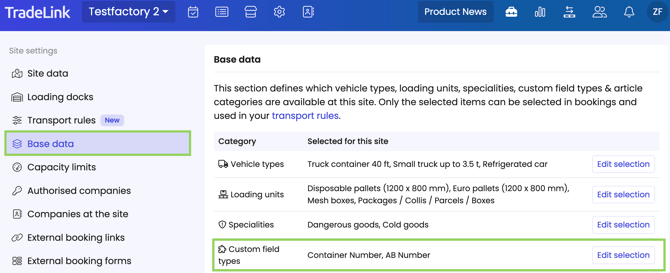
2. Add custom fields to your site's base data
In the site settings, you will find your site’s base data. Here you can add the custom fields created at company level to your site.
3. Custom fields in the external booking forms
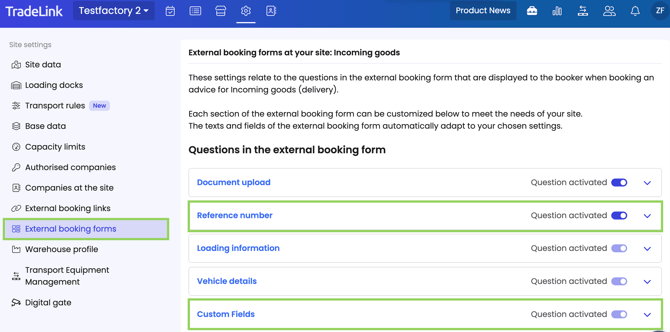
Also in the site settings, you will find the external booking forms.
Custom fields at advice level can be found in the “Custom fields” section. Here you can select which fields your booking partners can fill in and which must be filled in (mandatory field).
Custom fields at shipment level are located in the “References” section. Here you can also decide whether fields are optional in your partners’ booking form and which fields must be completed by the partner.
3. Custom fields in the Business Rule Engine
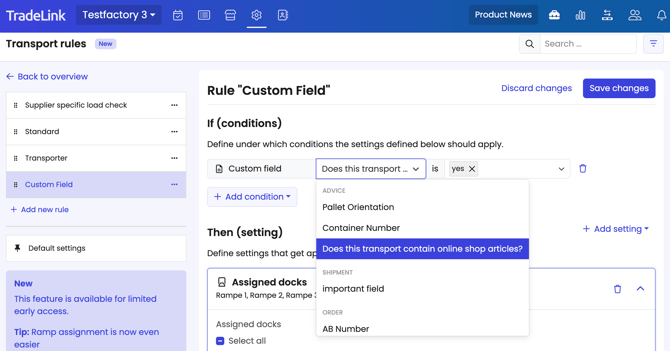
You can also add all custom fields for advices and shipments as conditions in the transport rules.
In this example, all transports containing items for an online shop are assigned to specific docks.