
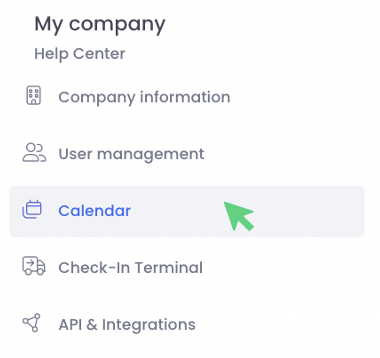
From your personal profile, you can jump to your company settings and create a calendar. To do this, click on your name, then on "Calendar" under "My Company". Then click on "+ Create new calendar".

Alternatively, you can also click on the plus sign next to the operating times in the location settings under the charging stations and land directly in the calendar settings.

Here you have the possibility to create a (new) calendar.
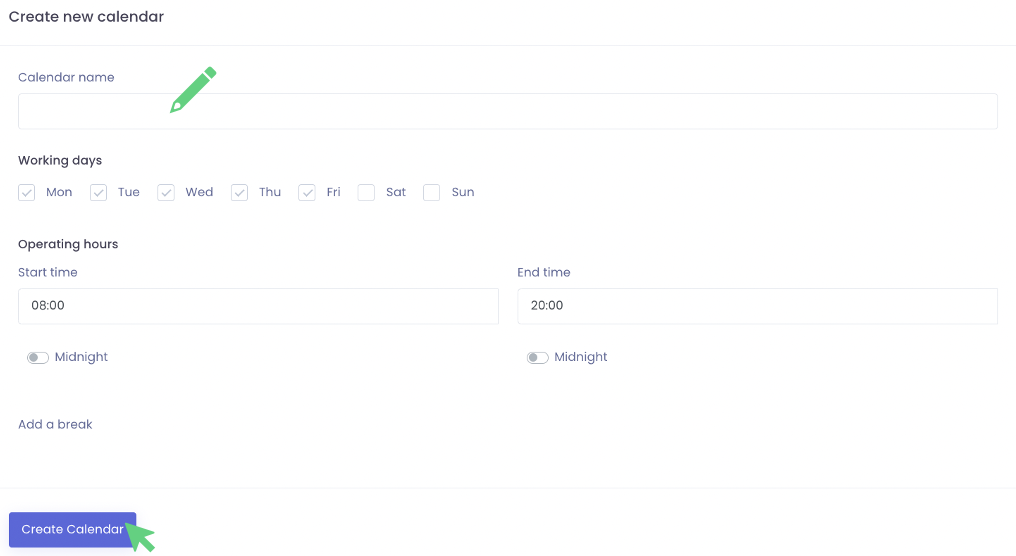
In the first step you can name your calendar (e.g. Calendar WE). You can also define the working days and operating hours.
You can also map breaks in your calendar by clicking on "Add break" and selecting the start and end time of the break.
You can create more breaks by clicking on "Add break" again.
Save your entries by clicking on "Create calendar". Your calendar will then appear under "Work calendar" and can now be assigned to your charging points accordingly.
You can create as many calendars as you need. For example, you can create one calendar for inbound and one for outbound.